Moofment App v1.5 brings intelligent speed management and expanded bike support to VanMoof riders. Whether you're navigating busy city streets or enjoying open roads, your bike now adapts to your environment automatically.
Adaptive Speed Mode (ASM)
What It Does
Adaptive Speed Mode dynamically changes your bike's regional speed setting based on your current GPS speed. Instead of being locked to a single speed limit, your bike automatically unlocks higher speeds as you accelerate and scales back down as you slow.
How It Works
ASM monitors your GPS speed and adjusts your bike's maximum supported speed in real-time by changing the regional setting:
Riders can customize these thresholds.
Why This Matters
Battery efficiency: Motor assistance at higher speeds consumes significantly more power. By automatically using the EU setting (25 km/h max) when you're cruising at lower speeds, ASM extends your battery range. US riders in particular benefit instead of running at 32 km/h constantly, the bike conserves energy during slower city riding and only draws full power when you're actually riding fast.
Smooth transitions: The speed thresholds create natural hysteresis you won't experience constant mode switching. The gaps between upshift and downshift speeds (22 → 32 vs 25 → 32) prevent flickering when riding near a boundary.
Your responsibility: Regional speed regulations vary. ASM is a tool that adapts to how you ride; compliance with local laws remains your responsibility.
Configuration
ASM is enabled per-bike in your bike's control sheet. Available for Series 1, 2, 3, 4, 5 but tested on 2, 3 and 5 series. The speed thresholds are preset based on regional regulations and bike capabilities.
CityGuard: Geofenced Speed Zones
What It Does
CityGuard lets you define location-based speed rules. Create zones where your bike automatically adjusts its speed limit whether that's slowing down in areas requiring extra care, or unlocking higher speeds on your own private property.
How It Works
CityGuard creates invisible boundaries around locations you define. When your bike crosses into a zone, Moofment automatically applies the speed setting you've configured for that area.
Creating a zone:
- Open the CityGuard section in your bike's settings
- Tap "Add Zone" and search for a location, or drop a pin on the map
- Adjust the zone radius (100m to 2km)
- Set the speed limit for this zone (lower or higher than your default)
- Name your zone (e.g., "School Zone," "My Property," "Park Path")
How detection works: Moofment uses iOS's native geofencing capabilities, which are highly battery-efficient. Your iPhone monitors your location in the background and triggers zone entry/exit events without constantly polling GPS.
When you enter a zone:
- Moofment receives a system notification
- Your bike's speed limit adjusts to your zone setting
- A subtle notification confirms the change
When you exit:
- Your original speed settings are restored
- No action required from you
Privacy Considerations
CityGuard zones are stored locally on your device. They are never uploaded to any server. Your speed zone preferences remain completely private.
Use Cases
Extra care zones: Create zones around schools, busy pedestrian areas, or shared paths where you want reduced speeds.
Private property: Define zones on your own land where you can configure higher speed settings your property, your rules.
Home arrival: Create a zone around your home to automatically adjust speed as you approach.
Your responsibility: CityGuard is a tool for personalization. How you configure your zones and where you ride at what speed remains your responsibility.
Series 6 Support: FOCUS & Ride Tracking
Series 6 Addition
Series 6 owners can now add their bikes to Moofment on their own. While we continue working on full native Bluetooth integration, this addition unlocks key features immediately.
To add your Series 6:
- Go to the Profile
- Tap 'Verified Rider'
- Select "Add Series 6" as your bike type
- Enter your bike's details
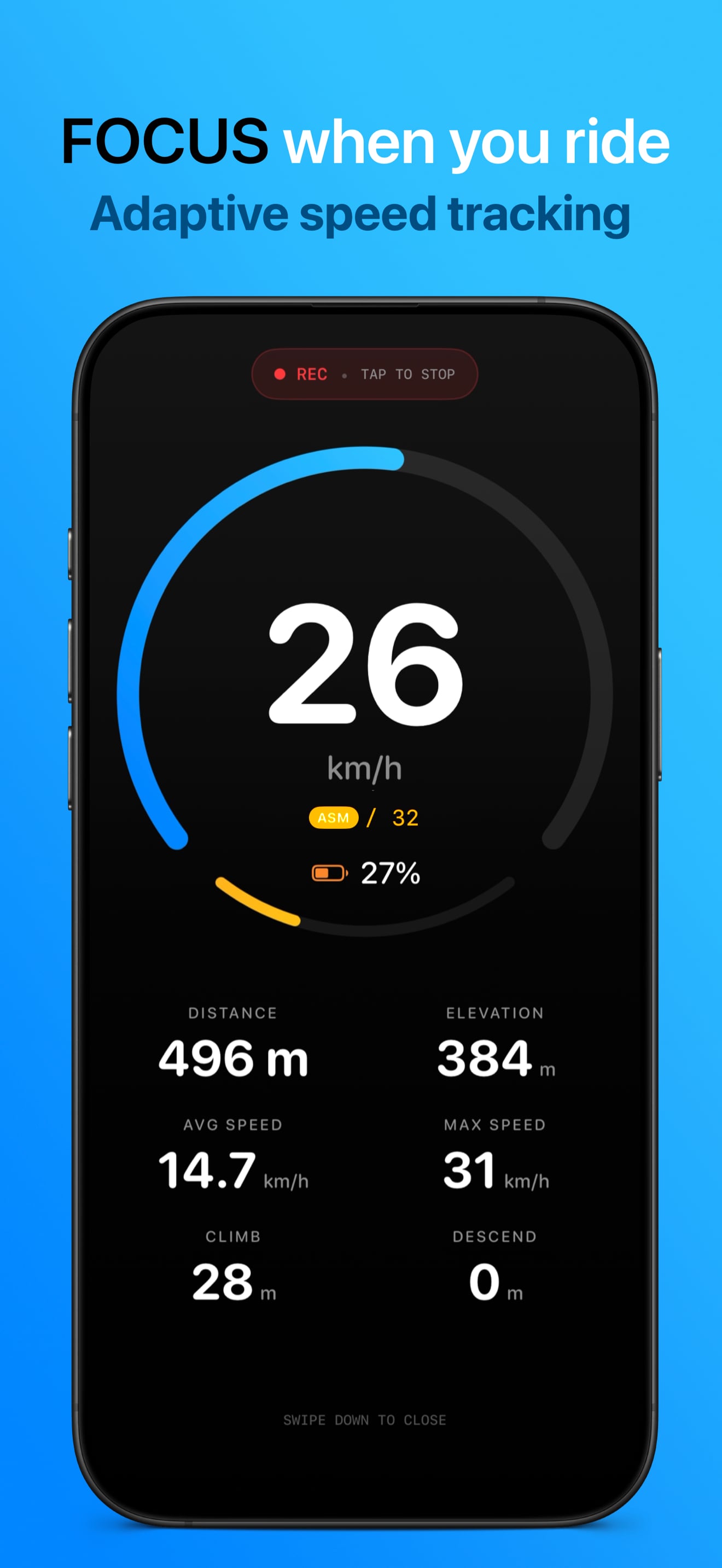
FOCUS Dashboard
Once your Series 6 is added, you gain access to the FOCUS Dashboard Moofment's real-time ride display designed for quick glances.
What FOCUS shows:
- Current speed: Large, readable display updated in real-time via GPS
- Distance traveled: Total distance for your current ride
- Ride duration: Time elapsed since you started tracking
- Elevation: Current altitude and elevation gain
FOCUS is designed as an interface that uses high-contrast colors and large text, readable even in bright sunlight or at a quick glance while riding.
Ride Tracking
Series 6 riders can track every ride with full GPS recording.
During your ride:
- Route recording with GPS coordinates
- Speed tracking and statistics
- Automatic pause detection when you stop
- Background tracking (works even when phone is locked)
After your ride:
- View your route on an interactive map
- See detailed statistics: distance, duration, average speed, max speed
- Elevation profile showing climbs and descents
- Weather conditions during your ride
Apple Health Integration: All tracked rides sync automatically to Apple Health as cycling workouts. Your distance, duration, and calories contribute to your daily activity goals and appear in the Fitness app.
What's Coming
Soon we'll start working on full Bluetooth integration for Series 6. When this arrives:
Seamless migration: Your manually added bike will automatically upgrade to full connectivity. All your ride history, settings, and preferences transfer over no re-setup required.
Full bike control: Access features similar to Series 1-5:
- Lock and unlock via Bluetooth
- Motor power adjustment
- Real-time battery monitoring
- Diagnostics
Note: Series 6 does not support regional speed settings at the hardware level this is a VanMoof design decision, not a Moofment limitation.
No data loss: Rides tracked with manual addition will remain in your history. The transition from manual to connected mode is designed to be invisible your bike just gains new capabilities.
ASM vs CityGuard: Which One to Use
These features serve different riding styles:
Choose based on your needs:
- Want automatic speed adaptation everywhere? → Enable ASM
- Want precise control over specific locations? → Disable ASM, configure CityGuard zones
- Riding in an area with mixed needs? → Pick the approach that fits your route
Requirements
- iOS Version: iOS 17 or later
- Tested Devices: iPhone 11 and newer
- GPS Accuracy: These features rely on your iPhone's GPS and BLE versions. Newer devices with improved location hardware provide more accurate speed readings and zone detection. Older devices work but may show slight delays in speed updates or zone transitions.
- Background Location: For CityGuard zone detection, Moofment requires "Always" location permission to monitor zone boundaries while the app is closed.
Getting Started
- Update to Moofment App v1.5 from the App Store
- Enable ASM in your bike's control sheet
- Create your first CityGuard zone for a location you frequent
- Series 6 owners: Add your bike manually to start using FOCUS and ride tracking
Ride safe.
Get Moofment v1.5
Adaptive Speed Mode, CityGuard geofencing, and Series 6 support all in one community-built companion.
Order your VanMoof S6
Series 6 is the first bike of the new chapter simpler, cleaner, built to last.
Affiliate links. VanMoofer may earn a commission at no cost to you. Prices and availability shown on vanmoof.com.